
Everyone gets a great view.


 Bestseller
Full Motion TV Wall Mount with Extra Long Extension
Rated 4.7 out of 5 stars151 Reviews40" to 80" 110 lbs Full motion

 Bestseller
Heavy Duty Dual Arm TV Wall Mount with Extra Long Extension
Rated 4.8 out of 5 stars50 Reviews40" to 90" 176 lbs Full motion


Heavy Duty Full Motion TV Wall Mount with Long Extension
Rated 4.7 out of 5 stars193 Reviews43" to 70" 220 lbs Full motion

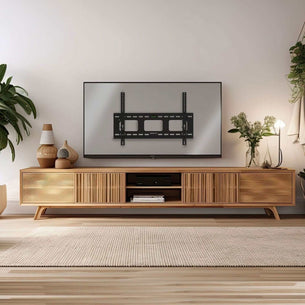


Heavy-Duty Ultra Low Profile TV Wall Mount with Locking Feature
Rated 5.0 out of 5 stars22 Reviews37" to 80" 175 lbs Fixed


Heavy-Duty Ultra Low Profile TV Wall Mount with Locking Feature
Rated 4.8 out of 5 stars46 Reviews42" to 90" 220 lbs Fixed


Full Motion TV Wall Mount with Gas Spring Arm
Rated 5.0 out of 5 stars1 Review37" to 80" 88 lbs Full motion


Full Motion Large TV Wall Mount with Extension
Rated 4.4 out of 5 stars5 Reviews40" to 80" 132 lbs Full motion
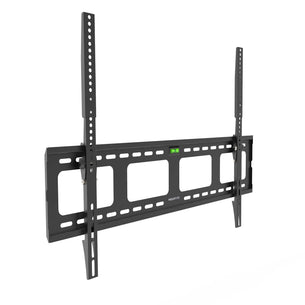

Heavy-Duty Tilt TV Wall Mount with Slim Profile
Rated 4.5 out of 5 stars48 Reviews43" to 90" 220 lbs Tilting


Heavy-Duty Tilt TV Wall Mount with Low Profile
Rated 4.7 out of 5 stars6 Reviews37" to 80" 175 lbs Tilting


Full Motion TV Wall Mount with Extra Long Extension
Rated 5.0 out of 5 stars1 Review43" to 100" 132 lbs Full motion


Pop-Out Video Wall Mount for Commercial Installations
Rated 5.0 out of 5 stars1 Review40" to 70" 154 lbs Full motion


What to Know Before Buying a 65-Inch TV Mount
Before you order, confirm three things: your TV's VESA pattern, its weight, and the wall type you're mounting into.
-
VESA pattern
Check the back of your TV or your TV's manual. Most 65-inch TVs — including Samsung, LG, Sony, and TCL models — use VESA 400x400 (mm). Some larger 65" frames use 600x400. All mounts on this page support 400x400 as a minimum. Product specs list the maximum VESA supported, so match that to your TV before adding to cart. -
Weight
A 65-inch TV typically weighs 55–80 lbs. Each mount lists its maximum weight capacity. Stay at or below 80% of the rated capacity for long-term stability. -
Wall type
Most mounts bolt into wood studs (standard 16" or 24" on center). If you have concrete, brick, or drywall without studs in the right location, see our no-stud TV mounts — they use a different anchoring system rated for the same weight.
Full Motion vs. Tilting vs. Fixed; Which Is Right for a 65-Inch TV?
-
Full motion (articulating)
The arm extends from the wall and lets you swivel, tilt, and rotate the screen. Useful when the TV needs to face different parts of the room or when you're mounting at an angle. Note: a 65-inch TV on a full motion arm requires studs 16" apart for a stable install. The added weight and leverage of a large screen amplifies any wobble from a poor anchor point. -
Tilting
Holds the TV flat and angles it downward, typically 0–15°. Keeps the TV close to the wall (usually within 2–4 inches). Good for high-wall installs where you need to reduce neck strain. Lower cost, easier to install. -
Fixed (low profile)
The TV sits 1–2 inches from the wall. No adjustment after install. Best for clean, permanent installs where aesthetics matter and the viewing angle is already correct. Lowest profile, lightest hardware.
Most buyers choosing a 65-inch TV mount choose full motion. The screen is large enough that viewing angle matters more at that size.
Compatible TV Brands for 65-Inch Mounts
Mount-It! 65-inch TV mounts are compatible with all major TV brands that use standard VESA hole patterns, including:
- Samsung (including The Frame and QLED models)
- LG (including OLED and NanoCell models)
- Sony (Bravia X and A series)
- TCL (5-Series, 6-Series, and QM series)
- Hisense (U6, U7, and U8 series)
- Vizio (M-Series, P-Series)
Samsung Frame TV note: The Frame 65" uses VESA 400x400 but has a thinner-than-average back profile. If you're mounting a Samsung Frame, check the mount's minimum arm depth to ensure the cable ports remain accessible after install.
Installation Overview for a 65-Inch TV
A 65-inch TV mount installs in four steps:
-
Locate studs
Use a stud finder to mark two studs 16" apart (or 24" if your wall spacing is wider). The wall plate must anchor into both studs for a 65-inch TV. Single-stud installs are not recommended at this screen size. -
Mount the wall plate
Use the included lag bolts to secure the wall plate to studs. Use the included bubble level to confirm it's straight before tightening. -
Attach the TV bracket
Bolt the bracket arms to the VESA holes on the back of your TV. Use the VESA spacers if needed to clear the TV's back panel or ports. -
Hang and adjust
Lift the TV onto the wall plate (two people required at 65 inches). Lock the safety pin. Adjust tilt or swivel to your preferred angle.
Full step-by-step instructions are included with every mount. See our complete TV mounting guide for wall-type-specific tips →